
Formatting your recipes
The plugin is designed to not enforce any kind of strict format on your recipe notes, and should handle lots of different methods gracefully. That said, certain features of the recipe card are enabled for parts of your recipe based on its formatting. A suggested standard format to work best with this plugin is displayed below, or otherwise read on to see what the specifc formatting requirements are for each feature.
![[thumbnail.jpg]]

Any preamble can go here.

## Ingredients
**Section 1**
- bulleted lists
- quantities at the start, e.g.:
- 180 grams butter
- 3 eggs

**Another section**
- Feel free to split your ingredients up
- and add notes underneath
- You don't need any bold headings if you don't want
- 15 of [[Another recipe]], pre-made

## Directions
1. Numbered lists
2. Feel free to include any markdown you like in your steps
3. You can also split these up in sections, with bold or level 3+ headings

## Notes
Anything else you want can go here.

## Nutrition
Common when recipes are downloaded from the web
Feel free to adapt the suggested format however you like, and if there’s a certain style you prefer that does not work well with the plugin currently, create an issue with an example recipe.
Side column sections
Configure in the plugin settings which sections you want to be pulled into the side column, based on their headings – the default is Ingredients|Nutrition. If there are no sections in a given document to be displayed in the side column, then the recipe will simply be displayed in a single column.
Checkable ingredient lists
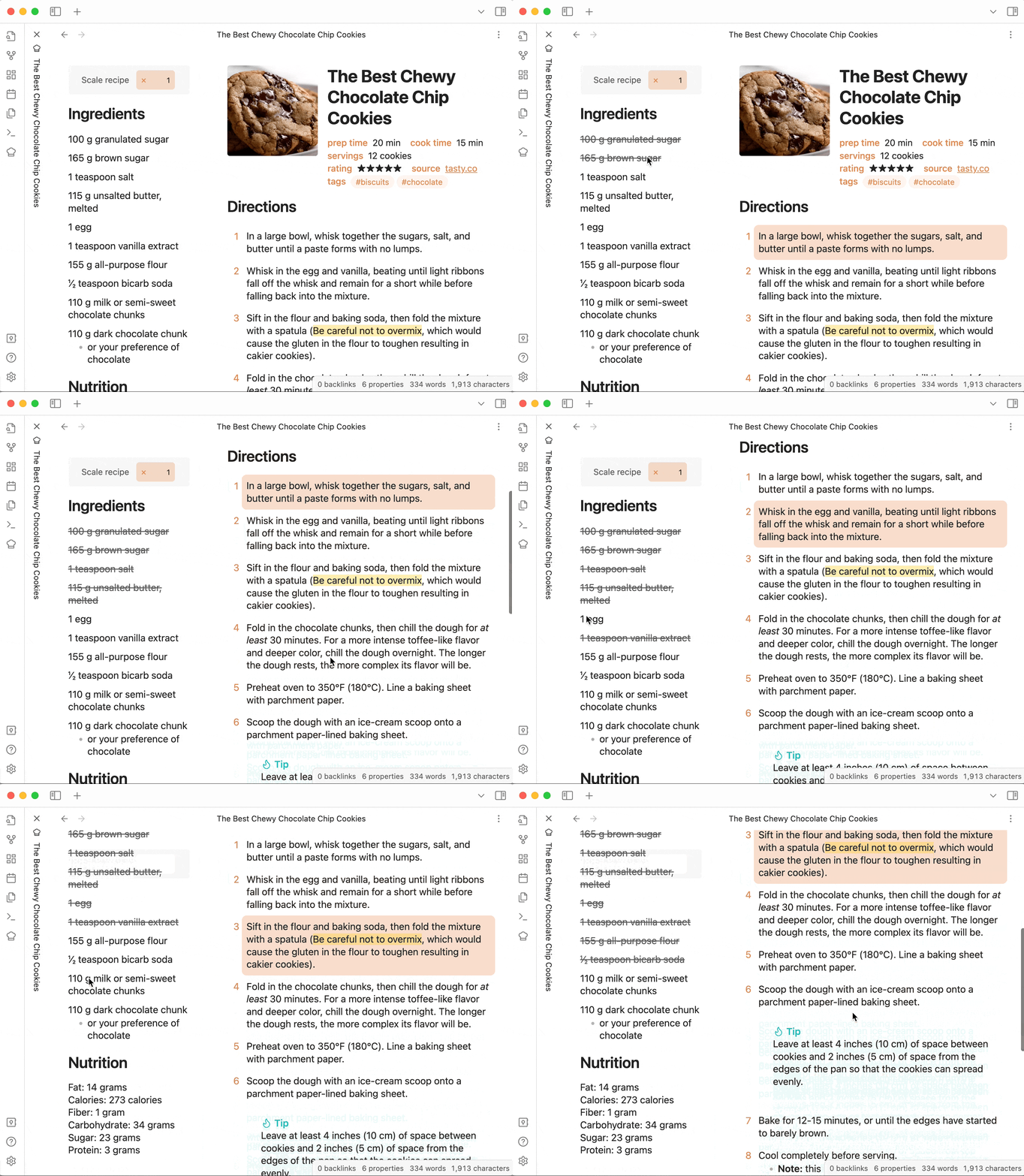
Any bulleted lists in the side column or that appear before any heading (excluding a H1 heading if the H1-as-titles option is enabled) will be converted into checkable ingredient lists – just click items to cross them out.
After focusing an ingredient (e.g. by clicking, tabbing) you can also use Tab and Shift+Tab to change the highlighted ingredient and Space to toggle crossing it out.
Click or tab elsewhere to stop highlighting the last-changed ingredient.
Selectable step lists
Any numbered lists or sequences of paragraphs in the main column will let you click on a step to highlight it. Click a different step to move the highlight. Only a single step can be highlighted at a time in a whole recipe.
After focusing a step (e.g. by clicking, tabbing) you can also use the arrow keys to move the selected step.
Recipe details and thumbnail
Properties defined on the recipe will be displayed below the title.
The first image in your note that is not under a heading is pulled out as a thumbnail.
Split steps
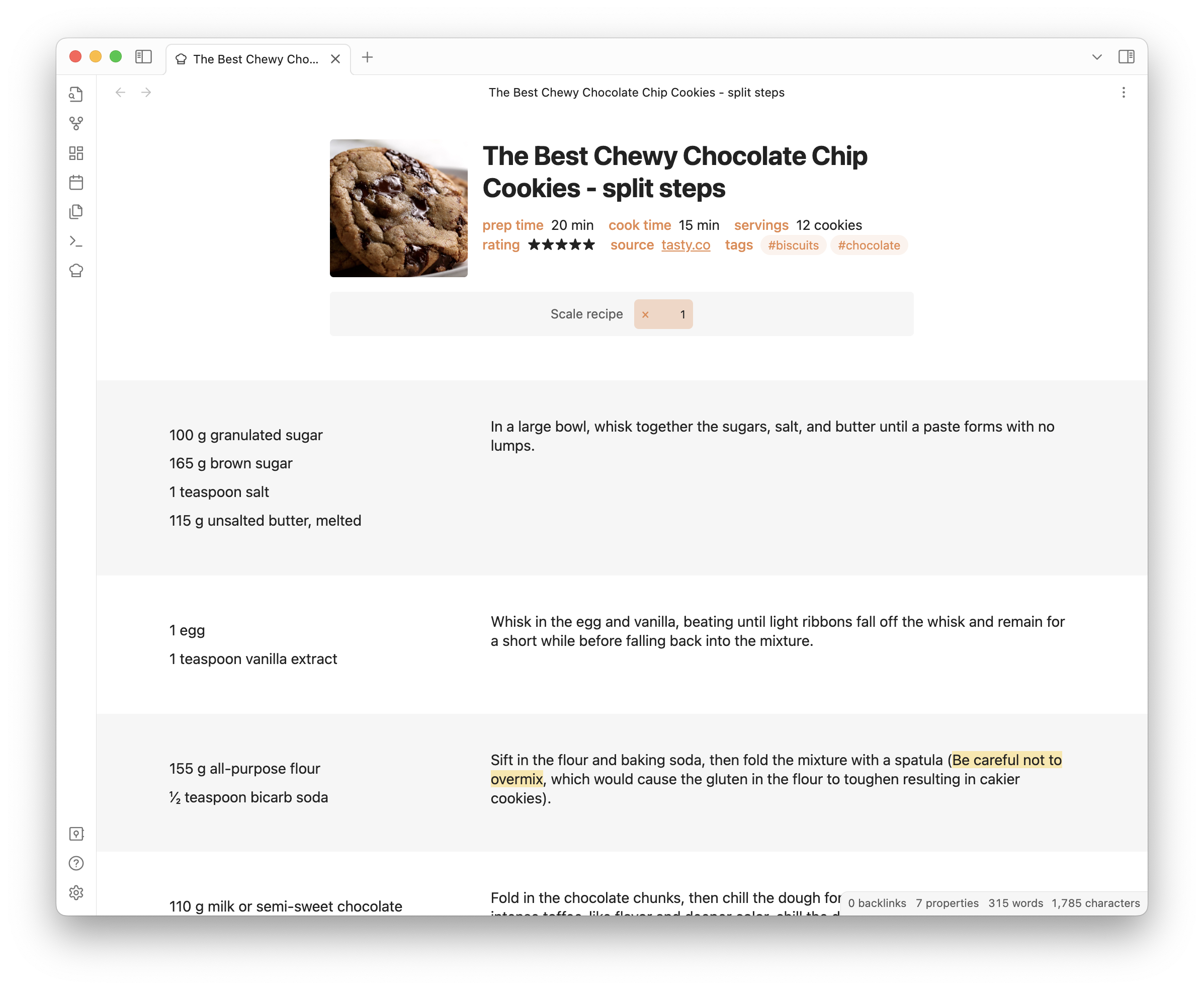
If you want to display ingredients alongside their corresponding steps, use horizontal rules (i.e. either --- or ***) to separate out the sections. The above formatting rules will be applied to each section independently. An example of this is shown below:
![[The Best Chewy Chocolate Chip Cookies.png|200]]

- 100 g granulated sugar
- 165 g brown sugar
- 1 teaspoon salt
- 115 g unsalted butter, melted

In a large bowl, whisk together the sugars, salt, and butter until a paste forms with no lumps.

---
- 1 egg
- 1 teaspoon vanilla extract

Whisk in the egg and vanilla, beating until light ribbons fall off the whisk and remain for a short while before falling back into the mixture.

---
- 155 g all-purpose flour
- ½ teaspoon bicarb soda

Sift in the flour and baking soda, then fold the mixture with a spatula (==Be careful not to overmix==, which would cause the gluten in the flour to toughen resulting in cakier cookies).

---
- 110 g milk or semi-sweet chocolate chunks
- 110 g dark chocolate chunk
    - or your preference of chocolate

Fold in the chocolate chunks, then chill the dough for *at least* 30 minutes. For a more intense toffee-like flavor and deeper color, chill the dough overnight. The longer the dough rests, the more complex its flavor will be.

---